FeinTech
In stock
FeinTech SP411 HDMI 2.1 Splitter 1 In 4 Out | 4K 120Hz | Downscaler
FeinTech SP411 HDMI 2.1 Splitter 1 In 4 Out | 4K 120Hz | Downscaler
Couldn't load pickup availability
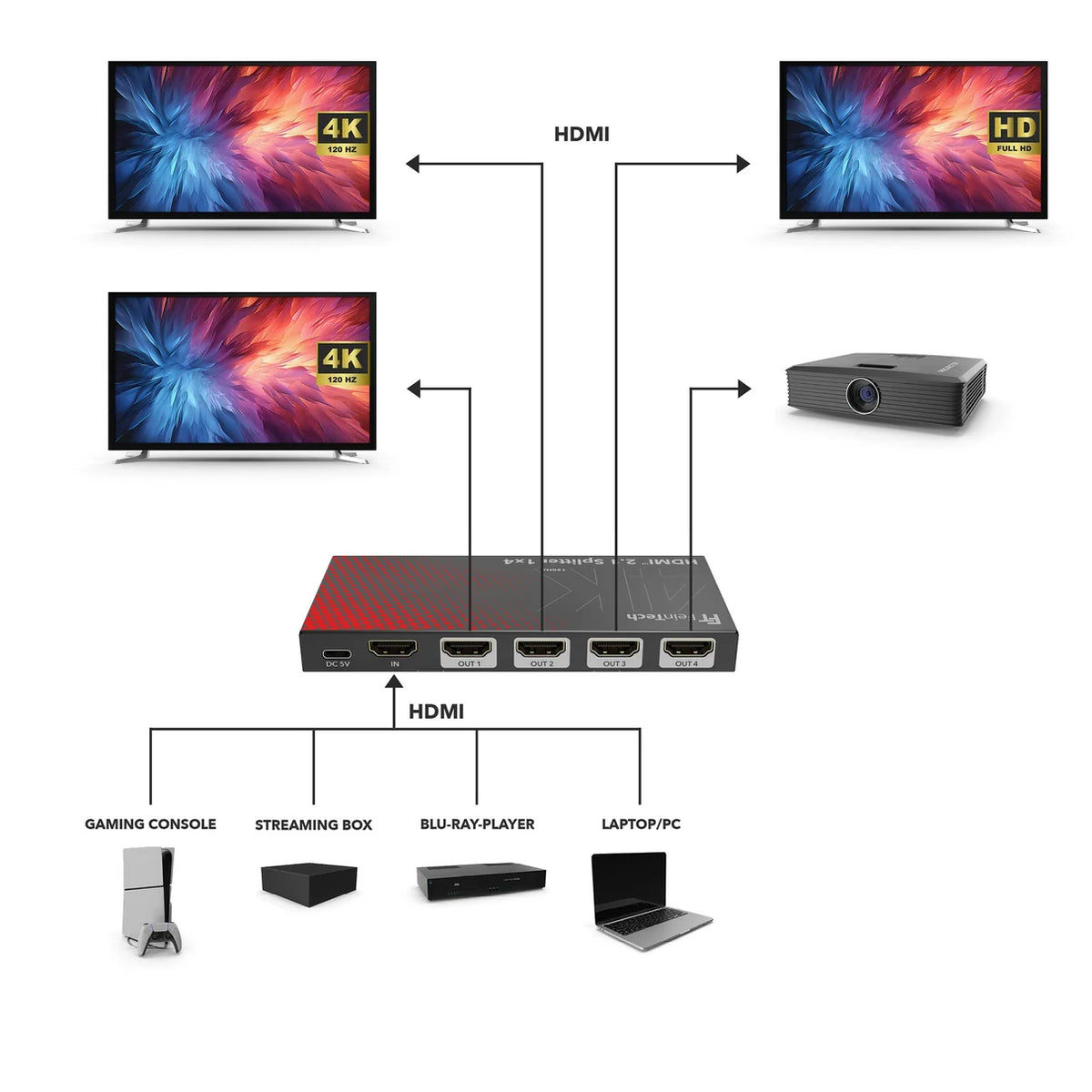
The SP411 HDMI 2.1 Splitter distributes the picture and sound signal of one HDMI source to up to four HDMI devices simultaneously. For example, you can connect a games console, streaming box, Blu-ray player or PC to several TVs, monitors, projectors or AV receivers at the same time. With up to 4K 120Hz, HDR and Dolby Vision, the splitter is suited to modern gaming, home cinema and multi-display setups. The integrated downscaler also allows displays with different resolutions to be used together, and three EDID modes let you define how the picture and sound capabilities of the connected devices are taken into account.
Distribute one HDMI source to up to four HDMI devices
The SP411 connects one HDMI source to up to four HDMI displays at the same time. The signal is available simultaneously at all four HDMI outputs, so one source can be used at several playback points without re-plugging. All connected displays show the same picture. When a computer is connected, the screen content is therefore duplicated on the connected displays; an extended desktop with different content is not possible with the SP411.
4K 120Hz for modern multi-display setups
With a bandwidth of up to 40 Gbit/s, the SP411 supports high-resolution HDMI signals up to 4K 120Hz with RGB or YUV 4:4:4. HDR10, HDR10+, HLG and Dolby Vision as well as HDMI 2.1 features such as VRR and ALLM are also supported. Signals up to 8K 60Hz with YUV 4:2:0 and Full HD at up to 240Hz can be transmitted too, provided the HDMI source, the connected devices and the HDMI cables support the respective functions and signal formats.
Use different displays together thanks to the downscaler
The integrated downscaler makes it easy to operate displays with different maximum resolutions together. For example, a high-quality 4K signal can be kept on compatible 4K displays while the SP411 automatically reduces the resolution to 1080p for connected Full HD displays. The downscaler is active in COPY and DOWNSCALE mode and only reduces the resolution; the refresh rate is retained (4K 120Hz becomes 1080p 120Hz, not 1080p 60Hz), so the lower-resolution display must support the output refresh rate. HDR, colour and audio formats are not changed either. Simultaneous output in three different resolutions (e.g. 8K, 4K and Full HD) is not possible.
Three EDID modes for the right picture and sound output
With the three modes COPY, AUTO and DOWNSCALE you define how the SP411 passes the picture and sound information of the connected devices to the HDMI source.
- COPY: the SP411 adopts the picture and sound information of the device connected to HDMI OUT1, so the source is aligned to this device. Lower-resolution displays on the other outputs are handled by the downscaler. Note that the audio output also follows the device on OUT1 – if a monitor or projector without suitable audio support is connected there, the source's audio output may be limited or missing.
- AUTO: the SP411 determines picture and sound formats supported by all connected devices – ideal for the most uncomplicated and compatible playback on all outputs. If one device does not support Dolby Atmos, for example, no Dolby Atmos is output.
- DOWNSCALE: ideal when displays of different capability are used together and the higher-resolution devices should use their capabilities as fully as possible; the downscaler automatically reduces the resolution for lower-resolution displays.
High-quality audio formats up to Dolby Atmos and DTS:X
Besides the picture, the SP411 transmits modern multichannel audio formats such as Dolby Atmos, Dolby TrueHD, Dolby Digital Plus, DTS:X, DTS-HD and LPCM up to 7.1. Which format the source actually outputs depends on the selected EDID mode and the capabilities of the connected devices.
HDMI-CEC control via HDMI OUT1
The SP411 passes HDMI-CEC through HDMI OUT1, so compatible devices can exchange CEC commands, e.g. for switching on and off together. CEC communication takes place exclusively via HDMI OUT1; the available functions depend on the connected devices.
Power supply via USB-C
The SP411 requires an external 5 V power supply with at least 1 A via USB-C. A USB-C to USB-A cable is included, a USB power adapter is not. For the most reliable HDMI-CEC and automatic switching on/off we recommend a separate 5 V / 1 A USB power adapter, so the SP411 stays powered regardless of the state of the connected devices.
Easy operation and clear status display
A button on the SP411 switches between the EDID modes COPY, AUTO and DOWNSCALE. LEDs show the selected mode and the status of the four HDMI outputs.
Specifications
- HDMI version: HDMI 2.1
- HDMI input: 1 × HDMI
- HDMI outputs: 4 × HDMI
- Copy protection: HDCP 2.3, HDCP 2.2 and HDCP 1.4
- Maximum data rate: 40 Gbit/s
- Supported video resolutions: up to 8K 60 Hz YUV 4:2:0, up to 4K 120 Hz RGB/YUV 4:4:4, up to 1080p 240 Hz RGB/YUV 4:4:4, Full HD, 720p, 3D video
- Colour spaces: RGB, YUV 4:4:4, YUV 4:2:2 and YUV 4:2:0
- Colour depth: 8, 10 and 12 bit
- HDR formats: HDR10, HDR10+, HLG, Dolby Vision
- Maximum downscaling input format: 8K 60 Hz YUV 4:2:0 or 4K 120 Hz YUV/RGB 4:4:4, uncompressed only
- HDMI 2.1 features: VRR (Variable Refresh Rate), ALLM (Auto Low Latency Mode)
- HDMI-CEC pass-through: on port 1
- Supported audio formats: LPCM 2.0 to 7.1, Dolby Digital, Dolby Digital Plus, Dolby TrueHD, Dolby Atmos, Dolby MAT, DTS, DTS-HD, DTS:X
- Recommended HDMI cable lengths at 8K: input under 2 m, outputs each under 2 m
- Recommended HDMI cable lengths at 4K 60 Hz: input under 4 m, outputs each under 4 m
- Power supply: 5 V DC, at least 1 A via USB
- USB power adapter: not included
- Power consumption: under 5 W
- Dimensions: 136 × 61 × 15 mm
- Net weight: 180 g
Share
More info
More info
Specifications
Specifications